
Akai MPK Mini MK3 Review: The Pocket-Sized MIDI Keyboard That Punches Above Its Weight
Categories : DJ Controllers
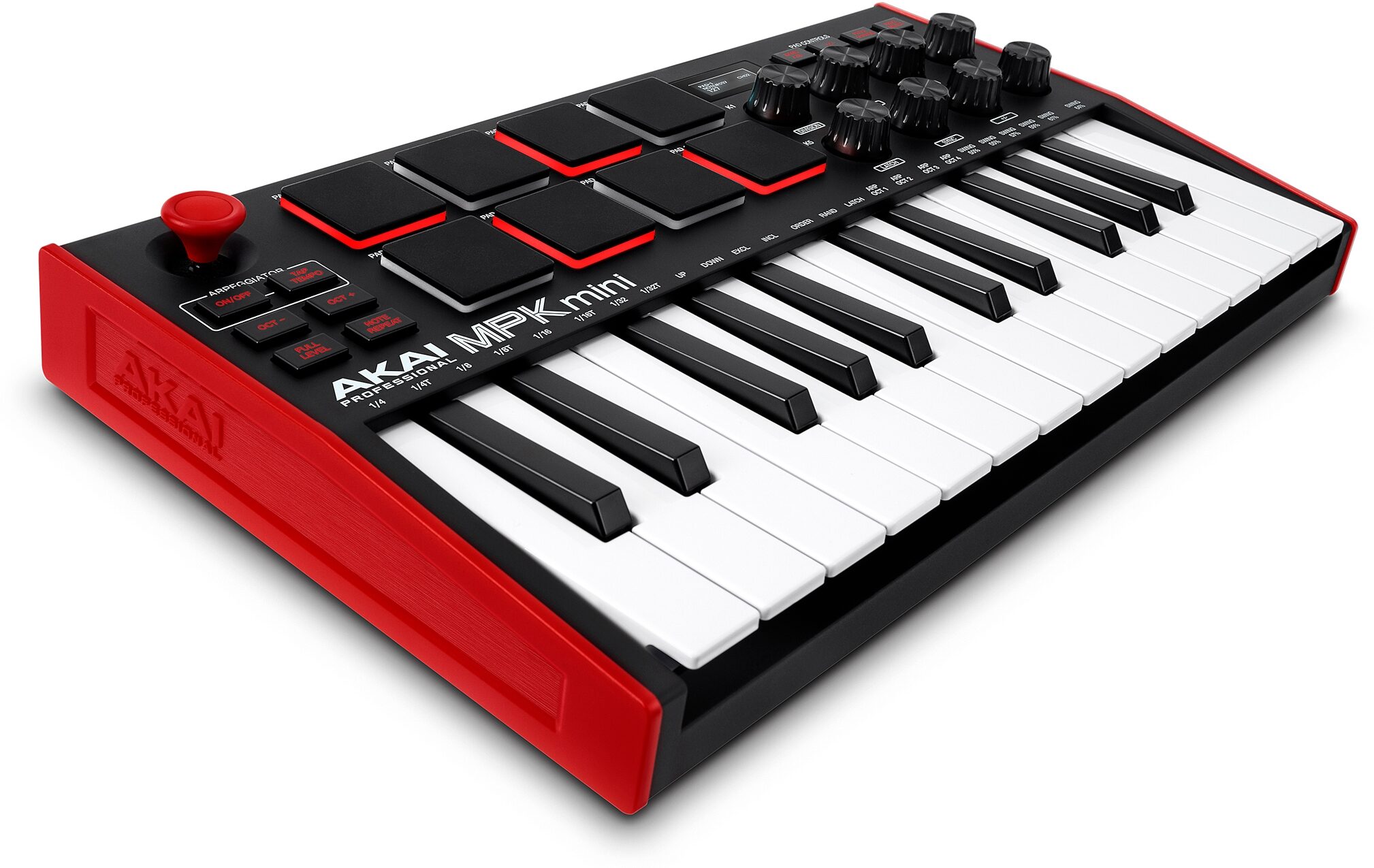
Akai’s MPK Mini line has been the gateway MIDI controller for a generation of beatmakers and bedroom producers. With the akai mpk mini mk3, Akai refined the formula—better feel, smarter workflow, and a tighter software bundle—while keeping the price and footprint small. After spending time writing, finger-drumming, and arranging on it, here’s a full review that cuts through the hype and tells you exactly what it gets right (and where you might want to look elsewhere).
TL;DR Verdict
- Best for: Producers who want a compact, affordable, and travel-ready controller with excellent pads and a fast sketching workflow.
- Standout features: Responsive mini keys (Gen-2 feel), eight MPC-style pads with Note Repeat/Full Level and two pad banks, a handy OLED screen, built-in arpeggiator, 4-way pitch/mod joystick, and eight assignable knobs.
- Trade-offs: Mini keys are cramped for pianists; no faders; limited hands-on mixing; and as a pure MIDI controller the akai mpk mini mk3 makes no sound without software.
What’s New in the MK3 Generation
The akai mpk mini mk3 is more than a cosmetic refresh. The keybed feel is improved over previous iterations, with a more predictable velocity response that makes soft passages easier and fast lines less “spiky.” The front-panel OLED display is small but surprisingly useful, giving you instant feedback on parameters, tempo, and program selections without squinting at your DAW. Pad sensitivity and consistency are better dialed-in, and the overall chassis feels sturdier in the hands. The core layout—25 mini keys, 8 pads, 8 knobs, and a 4-way joystick—remains familiar, so existing MPK Mini users can jump in without relearning their muscle memory.
Design & Build Quality
Physically, the MPK Mini MK3 nails the sweet spot: backpack-friendly, light, and bus-powered via USB. The case is rigid enough to survive daily carry, and the rubberized feet keep it from skating around on a desk. The unit is available in a few colorways (including the classic black/red motif), and the control labeling is clear. The joystick for pitch and modulation is a standout—less desk space than wheels, faster for quick bends, and great for one-hand performance while your other hand is on the pads or knobs.
Keys: Small but Playable
Let’s be honest: mini keys are an acquired taste. That said, the MK3’s upgraded keybed is one of the better ones in the compact class. There’s enough spring to rebound on trills and arpeggios, and the velocity curve is sensible out of the box for synths, plucks, and bass lines. You won’t be performing Rachmaninoff on it, but it’s more than capable for chords, leads, and utility parts.
Octave buttons give you instant access to a wide range, and the Arpeggiator ties in elegantly: latch a chord, set the rate and pattern, and you can sketch rhythmic ideas in seconds. For EDM, trap, and synthwave, it’s a productivity booster.
MPC-Style Pads: Still the Category Benchmark
Akai’s heritage shows up in the 8 backlit velocity-sensitive pads. They’re responsive, great for finger drumming, and feel more “drum machine” than “MIDI button.” With Full Level, every hit lands at maximum velocity—handy for consistent kicks and snares—while Note Repeat takes care of hi-hat rolls and fast fills. Two pad banks (A/B) effectively give you 16 pad slots, so you can keep drums on one bank and performance triggers or melodic samples on the other. For compact controllers, these pads remain a major selling point.
Knobs & Real-Time Control
You get eight assignable rotary knobs for shaping synths, dialing filter sweeps, controlling effects, or mapping to macros in your DAW. They’re smooth and reliable, and the OLED readout helps you understand what you’re tweaking. While fader fans may miss long-throw sliders for mixing, the knob set is enough for expressive sound design and live tweaks.
Arpeggiator, Note Repeat & Performance Tricks
The Arp offers multiple directions (up, down, and other musical patterns), tempo divisions, octave range, and a latch mode. With a tap-tempo button, you can lock grooves to a drummer or a DJ set without diving into software. Note Repeat pairs with the pads to churn out machine-perfect subdivisions. These are small features that add up to a fast, fun workflow—especially when inspiration strikes and you want to capture it before it disappears.
OLED Screen: Small Window, Big Help
Given the MPK Mini’s minimalist interface, the OLED display is a welcome upgrade. It shows patch numbers, parameter values, MIDI channels, and more. It saves you from guesswork, which speeds up sessions and reduces DAW toggling. You won’t do deep editing here, but for quick confirmation it’s exactly what this form factor needed.
Software Bundle & Setup
As a USB-MIDI controller, the akai mpk mini mk3 doesn’t make sound by itself; it triggers instruments in your DAW. Akai includes a starter software bundle that typically centers on MPC Beats (a streamlined DAW with the classic MPC workflow) plus selected virtual instruments and expansion content. For a newcomer, this is enough to start making full tracks immediately—load a drum kit, pick a bass, add keys, and you’re off. For experienced users, it’s a convenient add-on even if you mainly drive third-party synths in Ableton, Logic, FL Studio, Studio One, or Reaper.
In the Studio: Mapping & DAW Integration
The controller is class-compliant and plugs straight into macOS or Windows. Most major DAWs see it instantly, and mapping the pads and knobs is straightforward. Many users set up template projects with pads mapped to drum racks, knobs mapped to filter/resonance/ADSR or FX sends, and the joystick handling pitch/mod. Because the unit is bus-powered, there’s no wall-wart to pack; one cable and you’re good.
Beatmaking & Finger Drumming
If you’re buying the MPK Mini for beatmaking, you’re squarely in its wheelhouse. The pad feel is satisfying for kicks, snares, and hat patterns. Note Repeat is an easy win for trap hats and fills, and two banks let you keep one kit plus one set of one-shots at your fingertips. The compact form factor encourages you to tap ideas quickly, and the OLED keeps you oriented while you cycle pad banks and programs.
For Keyboardists & Melodic Work
For piano-centric players, mini keys are the biggest compromise. You can absolutely record chords, bass lines, and leads on the MK3, but if your primary workflow is two-hand piano parts or expressive performances that rely on aftertouch, you’ll outgrow this quickly. The joystick delivers musical bends and vibrato, and the arp can make simple triads sound huge—but the lack of full-size keys and limited key travel is a real factor. If that’s you, consider pairing the MPK Mini with a larger 49- or 61-key controller for studio work and keep the MPK as your travel rig.
Sound & Latency (A Quick Reality Check)
Because the MPK Mini MK3 is a MIDI controller, your audio performance depends on your computer, audio interface, and software settings. Keep buffer sizes reasonable (e.g., 64–256 samples) and use a reliable ASIO/Core Audio driver to reduce latency. If you experience lag, it’s not the keyboard—it’s the system.
Build Quality Over Time
Compact controllers often live hard lives in backpacks and on cramped desks. The MK3’s knobs and pads feel robust for the price, and the chassis resists flex. The keys will never feel like a premium synth, but they’ve proven durable for everyday writing and mobile sessions. The USB port is snug (a common failure point on cheaper controllers), so use a decent cable and avoid stress on the connector.
Who It’s For (and Who Should Skip It)
- Buy it if you want a portable, affordable controller that excels at beats, bass lines, and sketching full ideas quickly.
- Buy it if you’re a beginner who wants a complete “start making music now” experience with included software.
- Buy it if you already own a big keyboard but want a couch-friendly controller with great pads.
- Skip it if you’re a pianist who needs full-size keys, aftertouch, or weighted action.
- Skip it if you need faders and deeper hands-on mixing; a larger controller (or a separate fader box) is a better fit.
Pros & Cons
Pros
- Excellent MPC-heritage pads with Note Repeat, Full Level, and two pad banks
- Improved mini-key feel for a compact controller
- Arpeggiator + tap tempo accelerate ideation
- Handy OLED screen reduces guesswork
- Eight assignable knobs for sound-shaping
- Bus-powered, class-compliant, travel-ready
- Starter software bundle helps beginners get producing fast
Cons
- Mini keys remain a compromise for expressive players
- No long-throw faders for mixing
- Limited front-panel deep editing (expected at this size/price)
Popular Alternatives & How They Compare
- Novation Launchkey Mini Mk3: Excellent Ableton integration and creative modes (Scale/Chord). Pads are good, workflow is tight for Live users in particular. If you live in Ableton, it’s a strong rival.
- Arturia MiniLab 3: Premium build and encoders, deep Analog Lab integration for vintage-leaning sounds. Keys feel solid, pads are decent. Great if you love Arturia’s synth ecosystem.
- NI Komplete Kontrol M32: Slick integration with NI instruments and NKS plugins, 32 slim keys for a bit more range. Fewer pads and a different workflow—better for sound browsing and NI users than finger drumming.
- M-Audio Oxygen Pro Mini: Feature-rich with deep DAW presets, decent pads, and smart chord/scale modes. A bit more “utility controller,” less MPC vibe.
If pad feel is your priority, the Akai still leads. If DAW integration is paramount—especially Ableton—Novation edges ahead. If you want more keys in a small footprint, NI’s M32 is attractive.
Workflow Tips to Get the Most Out of It
- Create a template project: Map pads to your favorite drum rack, assign knobs to filter/resonance/FX sends, and save it. Opening your DAW to a ready-to-go setup keeps you in flow.
- Use the Arp as a writing tool: Latch chords and audition patterns to find rhythmic hooks you wouldn’t play by hand.
- Leverage pad banks: Keep Bank A for drums, Bank B for performance triggers (risers, vocal chops) or keyswitches.
- Dial velocity response: Adjust instrument velocity curves to match your touch; softer curves can tame hot pads or keys.
- Macro-map your synths: Group your favorite controls (filter cutoff, envelope amount, drive, FX) to eight macros and map them to the knobs for consistent muscle memory across projects.
Specifications (At a Glance)
| Keys | 25 mini keys, velocity-sensitive |
|---|---|
| Pads | 8 velocity-sensitive RGB/backlit pads, 2 banks (16 total slots); Note Repeat & Full Level |
| Controls | 8 assignable rotary knobs; 4-way pitch/mod joystick |
| Performance | Built-in arpeggiator with latch, tempo divisions, octave range; tap tempo |
| Display | OLED status/parameter display |
| Connectivity | USB (bus-powered), class-compliant |
| Software | MPC Beats + curated instruments/samples (bundle may vary) |
| Dimensions/Weight | Ultra-compact and backpack-friendly |
Frequently Asked Questions
Does the Akai MPK Mini MK3 make sound on its own?
No. It’s a MIDI controller that plays software instruments in your DAW or MPC Beats. You’ll need a computer or compatible device with virtual instruments to hear anything.
Is the akai mpk mini mk3 good for beginners?
Yes. It’s affordable, easy to set up, and the included software gets you producing quickly. The pads and arpeggiator help you make musical ideas fast, even with limited theory knowledge.
Can I produce full tracks with it?
Absolutely. Pair it with a DAW and a few plugins and you can create drums, bass, chords, leads, and automate effects—all from this controller. Many producers use it as a primary sketching tool.
How are the pads compared to competitors?
They’re among the best in this size class—responsive and satisfying for finger drumming, with handy Note Repeat and Full Level modes.
Will mini keys hold me back?
If you’re a pianist or perform two-hand parts often, yes—you’ll likely want a larger controller at home. If you’re primarily programming beats, bass lines, and synth parts, the keys are more than adequate.
Final Thoughts: A Modern Classic for Mobile Producers
The Akai MPK Mini MK3 earns its place as a go-to compact controller. It keeps what made the series famous—great pads, small footprint, and a fun workflow—while adding quality-of-life upgrades like the OLED display and refined key feel. It’s not the most deeply integrated controller for any single DAW, and it won’t satisfy pianists who need full-size keys, but for beatmakers, electronic producers, streamers, and music students, it’s a value champion. Throw it in a backpack, plug in a single cable, and you’ve got a portable ideas machine that can grow with you from your first loop to finished tracks.
Should You Buy the Akai MPK Mini MK3?
Yes—if you want an affordable, travel-ready controller with excellent pads and a fast, musical workflow. If you crave full-size keys, aftertouch, or faders for mixing, consider a larger sibling in your studio and keep the akai mpk mini mk3 as your on-the-go sketchpad. Either way, it’s hard to go wrong with a controller this capable at this size and price.
Reviews and Articles
Explore our in-depth review of the Boytone 12-Channel Bluetooth Studio Audio Mixer. Discover its build quality, features, sound performance, and who it’s best suited for.
Explore our comprehensive review of the Hercules DJControl Inpulse 200 DJ Controller. Ideal for beginners with a user-friendly design and solid performance.
Discover the strengths and weaknesses of the AlphaTheta DDJ-GRV6, a 4-channel DJ controller designed for both beginners and seasoned performers. Read our comprehensive review.
Explore our in-depth review of the Native Instruments Traktor Kontrol S3, a 4-channel DJ controller that combines robust build quality with excellent audio performance and user-friendly features.
Explore our detailed review of the Traktor Kontrol S8 DJ Controller by Native Instruments, covering build quality, features, audio performance, and ideal use cases.
Related Products :


